





If after-hours tickets keep landing on the same engineers, outsourced IT support services can help cover the work without another round of internal hiring. This guide explains how outsourced IT support works, which responsibilities can move, and what your team should keep.
You can start IT support outsourcing with one function and expand as the arrangement proves itself, so you don’t have to decide on the whole operation at once.
Key Takeaways
- A provider can run selected support functions while your team retains decisions about systems, budgets, and acceptable risk.
- Fully managed, co-managed, break-fix, and project-based arrangements divide responsibility differently, so compare the scope behind each label.
- Outsourcing fits best when a specific coverage or skills gap is clear enough to hand over and measure.
- Compare costs using the same functions, hours, sites, and service levels, with minimum charges and exclusions visible.
- Review security evidence, access controls, data handling, and incident procedures before agents connect to your environment.
- Move functions in stages, adding each one after its connections to the existing operation have been tested.
What Is Outsourced IT Support?
Outsourced IT support means a provider runs selected support functions or the day-to-day support operation, from help desk requests to network monitoring and field work. Your business retains decisions about systems, budgets, and approvals. The provider supplies the people, agreed coverage, and processes needed to deliver the work within the contracted scope.
You may also see IT support as a service, which usually describes the same work delivered through a recurring subscription.
Tier 1, Tier 2, and Tier 3 Support
Support tiers describe the depth of troubleshooting and the access each team needs.
- Tier 1 - Agents log requests, handle account access and password resets, answer how-to questions, and follow approved steps for known issues.
- Tier 2 - Specialists investigate problems that need deeper product knowledge or authorized system access, such as recurring faults and configuration issues.
- Tier 3 - Engineers or product vendors investigate underlying defects and changes that go beyond the support team’s authority.
Tier 1 is the usual place to start because its boundaries are easiest to document, and Tier 2 can follow once training and access are in place.
Outsourced IT Support vs an Outsourced IT Department
An outsourced IT department can take on a much broader remit, including infrastructure operations, vendor coordination, and advice on technology planning. Your business still needs someone accountable for budgets, priorities, and final decisions, even when the provider does most of the daily work.
Before deciding to outsource your IT department, separate the work into functions. You may need overnight monitoring and Tier 1 coverage while already having the right people for engineering and security decisions.
What IT Services Can Be Outsourced?

Most support work that runs on volume, hours, or field coverage can move to a provider, while decisions about infrastructure and spending usually stay with you. Which IT services should be outsourced first depends on where your team loses the most time.
| Function | What the provider handles | What usually stays with you |
|---|---|---|
| Help desk and Tier 1 | Account access, how-to questions, ticket updates, and routine troubleshooting | Approvals and escalations beyond the desk's agreed access or authority |
| Technical support | Tier 1 and Tier 2 troubleshooting for customers or end users | Product decisions, engineering fixes, and changes outside approved procedures |
| Customer support and live chat | Voice, chat, and email support using your policies and brand | Policy, pricing, and account decisions outside delegated limits |
| Network monitoring | Monitoring, alert triage, and agreed first-response actions | Network design, change approvals, and incident decisions beyond the runbook |
| On-site and field support | Installs, repairs, and site surveys by dispatched technicians | Site permissions, spending approvals, and vendor decisions |
| Application support | User questions and agreed troubleshooting for business applications | Product changes and escalations requiring application owners or vendors |
| AI-assisted Tier 1 | Routine requests and approved automated troubleshooting | Permission limits, approval of knowledge, and exceptions requiring human judgment |
Outsourced application support can cover internal software as well as products your team sells. What matters is whether agents have reliable documentation, a testable troubleshooting process, and a route to the application owner when the issue needs a deeper fix.
The benefit of outsourcing IT infrastructure monitoring depends on what happens after an alert, so agree on who decides whether it needs remote work, a site visit, or an internal engineer. CallTek uses COSMOS for network monitoring and SCOUT for network discovery and configuration management.
For field support, the arrival window for your actual locations matters more than a coverage map, along with who supplies parts and site access.
How the Pieces Work Together
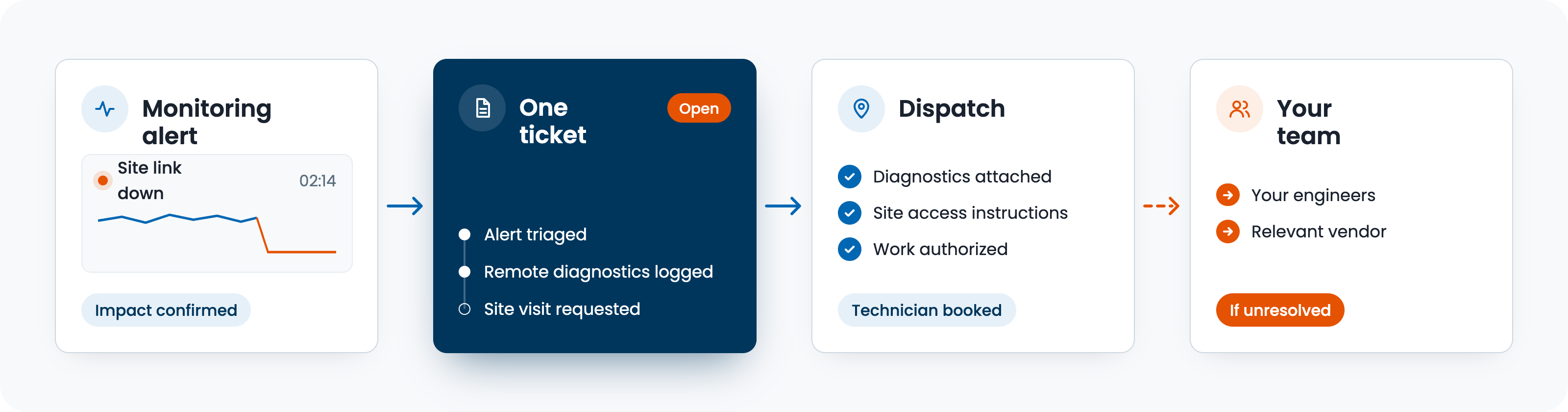
A shared ticket history and a named owner at each handoff can keep an incident moving across monitoring, remote support, and field work. Consider an overnight connectivity fault at one of your sites:
- The monitoring team triages the alert - It checks the affected service, confirms the impact, and opens or updates the incident record.
- Remote support investigates - The team runs approved diagnostics and records what it tried and the results.
- Field support receives the context - If the fix needs a site visit, the dispatch includes the diagnostics, access instructions, and work authorization.
- The responsible team confirms restoration - It checks that the service works, updates the incident, and escalates any remaining fault to your engineers or the relevant vendor.
Before launch, agree who owns the incident while another team is working on it. Dispatching a technician shouldn't leave everyone assuming someone else will update the customer or confirm the repair.
CallTek runs this on CAS, its own ticketing and analytics platform, so each handoff stays on one ticket trail.
Outsourced IT Support Models

Fully managed, co-managed, break-fix, and project-based support divide the work differently. Compare them by the responsibility the provider accepts, the work left with your team, and what happens between incidents.
| Model | What the provider owns | What you keep | Best fit | Common billing |
|---|---|---|---|---|
| Fully managed | Daily support across the agreed functions, including staffing and coverage | Business priorities, budgets, and approvals | Teams handing over most of the support operation | Recurring fee for the scope, with defined extras |
| Co-managed | Selected responsibilities, such as monitoring or after-hours support | The functions and decisions assigned to your internal team | Businesses with IT staff who need specific coverage or expertise | Recurring fee, usage charges, or a combination |
| Break-fix | Agreed troubleshooting when a problem is reported | Monitoring, prevention, and other work outside the incident | Discrete issues where reactive support is acceptable | Per incident or per hour |
| Project-based | A defined piece of work, such as a rollout or migration | Ongoing operations and work outside the project | Work with a clear outcome and acceptance criteria | Fixed fee, milestones, or time and materials |
Fully managed support is sometimes called outsourced IT management because the provider coordinates daily operations within the agreed scope.
Break-fix can mean lower charges in a quiet month, but nobody is watching between incidents, so failures tend to reach your users first.
Delivery location is a separate choice from the support model, so ask how the proposed locations affect working hours, language coverage, and escalation to your team.
CallTek provides fully managed and co-managed support through Shared Support and Dedicated Teams. Shared Support suits steady request volumes and after-hours coverage; Dedicated Teams are assigned to environments that need more account-specific knowledge or capacity.
Outsourced IT Support vs Managed IT Services
The differences between an IT service provider and a managed service provider usually come down to the ongoing responsibilities accepted in the agreement. An IT provider may deliver a specific support function or project, while an MSP takes continuing responsibility for an agreed part of the environment. The same company can do both.
When comparing managed IT services vs outsourcing, remember that managed services are themselves a form of outsourcing, so compare the scopes instead of the names.
To see what managed IT support includes in a proposal, read the responsibility list and exclusions, since two providers can assign patching, backups, and vendor escalation differently under the same label.
In-House vs Outsourced IT Support
In-house IT support gives you direct oversight of the people doing the work and close access to business knowledge, while outsourcing adds coverage or skills that would take time to build internally.
| Area | In-house | Outsourced |
|---|---|---|
| Coverage hours | Depends on your staffing and on-call arrangements | Defined by the contracted hours and staffing plan |
| Hiring and training | Your team recruits and develops staff | The provider recruits, while both sides contribute environment-specific training |
| Cost | Salaries, tools, and operating overhead | Contract fees, usage charges, and any retained internal work |
| Control | Direct management of daily work | Management through permissions, responsibilities, service levels, and reporting |
| Knowledge | Held by staff and internal documentation | Shared through training, runbooks, and accessible records |
| Scaling | Depends on hiring and available capacity | Depends on contracted capacity, lead times, and available skills |
Salary is one part of the comparison. The US Bureau of Labor Statistics reports a median annual wage of $61,860 for computer user support specialists in May 2025. Benefits, tools, training, and management add to the cost of running that role.
Maintaining 24/7 help desk coverage requires a staffing plan that accounts for leave and overlapping shifts. An in-house IT team can be a better fit when work depends heavily on business context, requires close coordination with engineering, or involves frequent system changes.
Signs You’ve Outgrown In-House IT Support
Companies outgrow in-house IT support when responsibilities expand faster than the team can cover them. The early signs are often operational:
- After-hours backlog - Requests wait until morning even when the affected service needs attention overnight.
- Engineers stuck in Tier 1 - Routine troubleshooting repeatedly displaces work that requires senior expertise.
- Hiring lags growth - New sites, customers, or time zones add responsibilities before people are ready to cover them.
- Leave exposes gaps - A single absence leaves nobody with the access or knowledge to run a function.
- Assurance work slips - Access reviews, documentation, and audit preparation compete with an already full support workload.
For companies that struggle with in-house IT support, these signs usually point to one specific gap, such as an uncovered shift, instead of a reason to hand off everything.
Benefits of Outsourcing IT Support
The benefits of outsourcing IT support grow when connected functions share information and responsibility, and the biggest gain is less coordination work for your team.
- Connected handoffs - An incident moves from monitoring to remote support or field work with its ticket history and a named owner, so your team doesn’t rebuild the context at each step.
- Access to different specialists - You can add monitoring analysts or field technicians alongside support agents within the agreed scope.
- A repeatable approach for new sites - Existing procedures can be adapted to another location, with local access and coverage checked before launch.
- Less supplier administration - Consolidating suitable functions can reduce separate contracts, reporting formats, and review meetings.
The advantages of outsourcing IT support only hold if those connections are real, since one provider with disconnected queues still leaves your team chasing updates.
The Risks and How to Control Them
The pros and cons of outsourcing IT support depend partly on how the agreement handles cross-boundary work. These are the failure points to address before launch.
| Risk | What it looks like | What to agree |
|---|---|---|
| Gaps between functions | Teams pass an incident around because it falls outside each narrow scope | A responsible incident owner and a defined route for work crossing teams |
| Limited access to records | Your team cannot retrieve ticket history, runbooks, or reports when needed | Ongoing access, usable exports, and ownership of documentation |
| Supplier coordination overhead | Several queues and reports leave your team assembling the full picture | Shared reporting and responsibility for coordinating the suppliers that remain |
| Excessive access | Agents retain permissions unrelated to their assigned work | Approved roles, regular access reviews, and removal when responsibilities change |
| Dependence on one provider | Tooling or undocumented processes make a move difficult | Documented procedures, export formats, and agreed transition support |
How Much Does Outsourced IT Support Cost?
Outsourced IT support costs depend on the included functions, coverage hours, and workload.
That’s why outsourcing costs vary so much between proposals: a quote combining remote support, monitoring, and field visits uses several billing units, so break it down before you compare.
Pricing by Function
| Function | Common pricing | Watch out for |
|---|---|---|
| Help desk and Tier 1 | Per user per month or per ticket | Supported users, ticket definitions, and included work |
| Technical and customer support | Agent hours, contacts, or a dedicated team | Minimum commitments, available capacity, and extra-volume charges |
| Network monitoring | Per device or per site per month | Monitored assets, alert triage, and response work included |
| On-site and field support | Per job or dispatch | Travel, arrival windows, parts, and after-hours charges |
| Fully managed scope | Recurring fee, often based on users or the agreed estate | Exclusions, change requests, and adjustment terms |
A monthly fee often covers a defined workload, with usage charges above it, so ask which parts are fixed. A shared platform may reduce duplication, but integrations and licenses can still add charges, and overnight capacity shared across functions may cost less where skills and workload allow. Ask providers to show the staffing assumptions behind any savings.
Comparing Quotes Line by Line
An IT support outsourcing pricing comparison needs the same functions, sites, device counts, hours, and service levels in every proposal. Ask for a separate cost for each function alongside any combined fee, with setup charges and minimum commitments visible.
Then test a normal month and a difficult one against the charging rules. Show providers the same example of an outage, a new site opening, or a surge in contacts, and ask which charges change. Include the internal work you will retain, such as approvals and supplier management, when comparing the total.
Is Outsourced IT Support Secure?
Outsourced IT support can meet your security requirements when the provider’s controls and access limits fit the work you’re delegating, and the contract says so.
- Security evidence - Review the SOC 2 Type II report, ISO 27001 certification, and applicable PCI DSS evidence, checking the services and locations covered.
- Controlled access - Agree which systems each role can reach, how access is approved, and when it is reviewed or removed.
- Data handling - Confirm storage locations, retention periods, permitted uses, and the return or deletion process at the end of the engagement.
- Traceable activity - Check that relevant actions are logged and that your team can retrieve the records needed to investigate an incident.
- Delivery locations - Identify where agents and subcontractors work and which physical and network controls apply.
- Incident response - Set notification responsibilities and a route to the people authorized to contain a security incident.
If you are considering outsourced IT support with cybersecurity, separate routine support from security responsibilities in the scope. Spell out who monitors threats, investigates suspected compromise, and authorizes containment, whether that is the support provider, your team, or a separate security partner.
For smaller teams, outsourced IT support security risks can be harder to spot when nobody owns supplier access after onboarding. Assign that responsibility, schedule reviews, and check that accounts are removed when agents leave or the scope changes.
Which Businesses Benefit Most?
Outsourced IT support tends to pay off most for businesses whose users need help at volume or around the clock, whatever their size.
By Company Size
- Small businesses - The benefits of outsourced IT support for small businesses often start with access to support beyond what one generalist can cover, although minimum fees and exclusions need close attention.
- Mid-sized and tech-dependent teams - A provider can cover defined queues, shifts, or specialist functions while internal staff retain engineering and operational decisions.
- Enterprises - Support can be added for a region, acquisition, or function without moving the entire environment to a new provider.
- MSPs - A white-label partner can add capacity under the MSP’s brand, with escalation and client ownership agreed in advance.
By Industry
- Healthcare - Support for clinical systems and connected devices needs clear priorities and limits on access to sensitive information.
- Hospitality - Guest connectivity, property systems, and payment technology need support during busy check-in periods and overnight.
- Telecom and broadband - Subscriber support needs a coordinated response when an outage drives contacts and network alerts at the same time.
- SaaS - Product support needs a reliable path from customer troubleshooting to engineering, with diagnostics attached.
CallTek also supports other industries, including utilities, education, and multi-dwelling units.
How to Choose an IT Support Provider
Choose an IT support provider by testing whether it can staff your actual scope and manage the points where responsibilities meet. A general promise of round-the-clock support tells you little about monitoring coverage, field arrival, or escalation to your engineers.
| What to check | What good looks like |
|---|---|
| Functions covered | A responsibility map showing what the provider resolves and what returns to you |
| Escalation across functions | An example incident showing ownership and updates as work moves between teams |
| Ticketing and integration | A demonstration of the shared history, required integrations, and usable exports |
| Monitoring scope | The assets covered, alert rules, and agreed response actions |
| Field coverage | Arrival windows and delivery arrangements for your locations, including subcontractors |
| Coverage hours | Staffing and escalation availability for each function and shift |
| Certifications | Relevant reports, certifications, and compliance evidence with their scope and dates |
| Reporting | A sample view showing incidents and performance across the functions in scope |
When shortlisting outsourced IT providers, send each one the same requirements and ask it to identify exclusions. An explicit limit is easier to plan around than an assumption discovered during an outage.
SLA Targets That Span Functions
Service levels should measure the handoffs as well as the work inside each team. Otherwise, every team can meet its own target while an incident spends too long waiting between them.
| SLA line | What to ask for |
|---|---|
| Alert to ticket | When timing starts, who triages the alert, and when a ticket must exist |
| Ticket to dispatch | The approval needed and the time allowed to arrange on-site work |
| On-site arrival | Arrival windows for the locations covered, including access conditions |
| Escalation between functions | Triggers, receiving teams, and who keeps ownership while the next team accepts work |
| Resolution by priority | Restoration targets measured across the incident, with dependencies and exceptions defined |
| Reporting | How results are calculated and how missed handoffs appear in reports |
| Missed targets | Corrective actions, review obligations, and any agreed service credits |
Ask when each clock starts, pauses, and stops, including pauses while waiting for access, parts, or approval. Also separate restoring service from a permanent repair, since they may have different targets.
Before you score proposals, decide which requirements are essential, then judge the evidence behind each answer before you weigh the cost. When outsourcing IT support, ask the provider to turn any important verbal commitment into a written responsibility in its proposal.
Which Function to Hand Off First
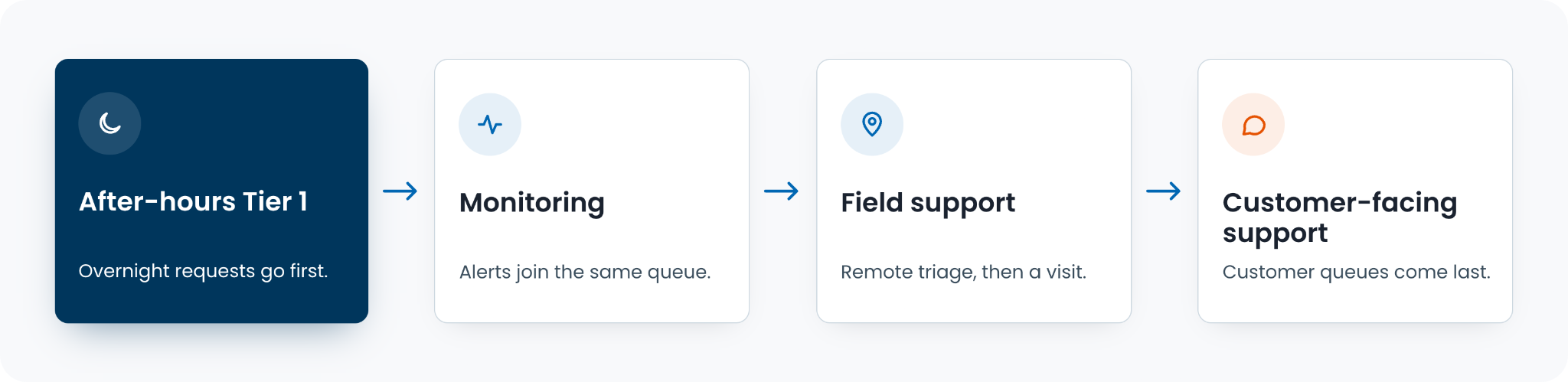
Knowing when to outsource IT services starts with identifying a gap your current team cannot reasonably cover. The order should then follow the work and its dependencies. For a team with an after-hours gap, the sequence might look like this:
- Move after-hours Tier 1 - Keep daytime support in place while the provider takes agreed overnight requests, with an internal contact available for exceptions.
- Connect monitoring - Once ticket ownership works, route relevant alerts into the same process and confirm who is authorized to act on them.
- Add field support - Give dispatchers the remote diagnostics, site instructions, and approval rules needed to arrange a useful visit.
- Extend to customer-facing support - Add customer queues when agents can use the right policies, update customers, and reach the teams responsible for resolution.
- Review the mix - Check each quarter whether the arrangement still matches demand, retained skills, and the work your team wants to own.
Planning Your First Handoff
Map the layers you run today, mark the hours and functions your team can't cover, and you'll usually see where outsourcing should start. That map also gives every provider conversation the same starting point.
When you're ready to talk it through, see how CallTek runs IT support across every layer, or book a strategy call with our team.
Book Strategy Call