




.jpg)
Outsourcing your help desk keeps requests moving at any hour, including nights and weekends, without adding headcount or pulling senior people away from project work. This help desk outsourcing guide explains what to hand off, what coverage will cost, and what to put in the contract before you sign.
If a growing queue has your best engineers spending mornings on password resets, use this guide to compare providers on the things that decide whether the arrangement works.
Key Takeaways
- Help desk outsourcing hands Tier 1 and routine requests to a provider, while your team keeps escalations, sign-offs, and system changes.
- The biggest benefit is coverage without hiring, and the biggest risk is fuzzy scope, which you fix by agreeing what escalates before launch.
- Covering one seat around the clock takes more than four full-time people, so nights and weekends are often the first hours worth handing off.
- Providers bill per user, per ticket, per agent hour, or for a dedicated team, and coverage hours and ticket volume drive most of the cost.
- Start with 90 days of ticket data before you talk to any provider.
- Write scope, SLAs by time band, reporting access, and exit terms into the contract.
- MSPs, ISPs, and hospitality teams tend to benefit most because their end users need help at volume and around the clock.
What Is Help Desk Outsourcing?

Help desk outsourcing means a specialist provider runs the first line of your support queue. Its agents log requests, resolve routine issues such as password resets and how-to questions, then escalate the rest with the ticket history attached. Your team keeps ownership of systems, decisions, and any work that needs deeper access or sign-off.
What Does an Outsourced Help Desk Handle?
An outsourced help desk usually takes Tier 1 (sometimes called Level 1): account access, password resets, basic connectivity, device setup, and ticket updates. Tier 2 work, such as deeper troubleshooting against your runbooks, can move over once the provider understands your environment. Changes to infrastructure and work that requires sign-off usually stay with your team.
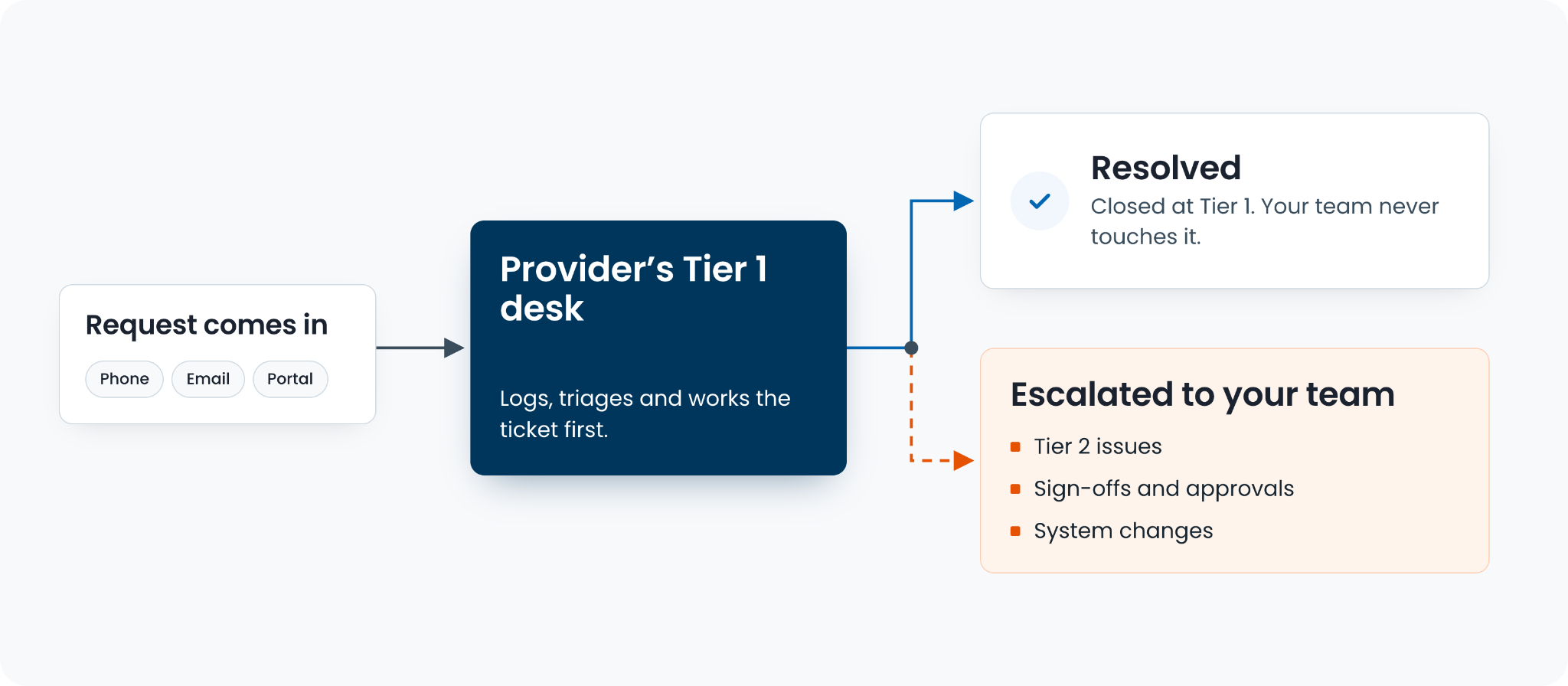
Scope can also stretch to desktop support outsourcing and application help desk work, where agents answer questions about a specific product or internal tool.
Can One Desk Support IT and Customer Service?
One outsourced desk can support IT and customer service teams at once when routing rules keep internal requests separate from customer-facing ones. That setup is often why teams look for help desk outsourcing that supports IT and customer service teams: employees get locked out of their accounts, customers cannot get online, and both queues end up on the same small team.
For internal IT teams, outsourced IT services usually work best as a clear split: the provider handles Tier 1, while your engineers keep anything that touches infrastructure. CallTek follows the same approach, handling routine tickets on its desk and setting escalations on the client’s terms before launch.
How It Relates to BPO and Service Desks
Help desk outsourcing is a form of business process outsourcing, or BPO. You may also see the same work sold as help desk as a service, a label that usually describes a subscription model. A service desk is also a support function, so a provider-operated service desk can fall under BPO as well.
Pros and Cons of Outsourcing Your Help Desk
The main benefits of outsourcing help desk services are coverage without new hires, faster first responses, and senior staff back on project work. Address the tradeoffs early: most problems trace back to unclear scope, thin documentation, or a contract that leaves too much open to interpretation.
Benefits of Outsourcing IT and Help Desk Support
Most advantages of outsourcing IT support come from taking work off your team's plate, so they can focus on projects and the issues that actually need their judgment.
- Coverage without hiring - Nights, weekends, and volume spikes get handled without adding shifts.
- Faster first response - A staffed queue picks up requests as they land, so users stop waiting for someone to free up.
- Senior staff back on projects - Tier 1 stops interrupting the people you hired to build and fix systems.
- Cost that tracks volume - Depending on the model, you pay for the support you use instead of carrying a full team through quiet periods.
The Risks and How to Control Them
The usual disadvantages of help desk outsourcing come down to five risks: fuzzy scope, knowledge loss, unfamiliarity with your products, lock-in, and data access. Each has a practical control that belongs in the handover plan or contract.
| Risk | What it looks like | How to control it |
|---|---|---|
| Fuzzy scope | Tickets bounce between desks, and nobody owns the fix | Agree in writing what resolves on the provider's desk and what escalates, before launch |
| Knowledge loss | Agents ask questions your team answered years ago | Hand over runbooks, and keep the knowledge base in your name |
| Product unfamiliarity | Generic answers to specific problems | Training on your environment and a pilot period on one queue |
| Lock-in | Hard to change scope or leave | Exit and transition terms in the contract |
| Data access | Agents can see systems they don't need | Least-privilege access and a current SOC 2 Type 2 report |
The pros and cons of outsourcing IT support mostly come down to how much control you retain. The provider can take the work, while you set the rules for escalation, access, reporting, and changes. Put those rules in the contract rather than leaving them to a kickoff call.
Should You Outsource Your Help Desk?
Outsourcing fits when ticket volume outgrows your team, requests arrive outside office hours, or the same routine issues keep filling the queue. It is a harder case when most tickets need deep system access, or judgment calls only your engineers can make. When people ask why outsource IT support at all, the practical answer is usually engineer time, and 90 days of ticket data will show how much of it Tier 1 is taking.
When 24/7 Help Desk Support Is Worth It
24/7 help desk support is worth paying for when a meaningful share of requests lands outside office hours, or when an overnight outage costs more than the coverage. For most teams, outsourcing is the practical way to provide that coverage without building a round-the-clock internal rota.
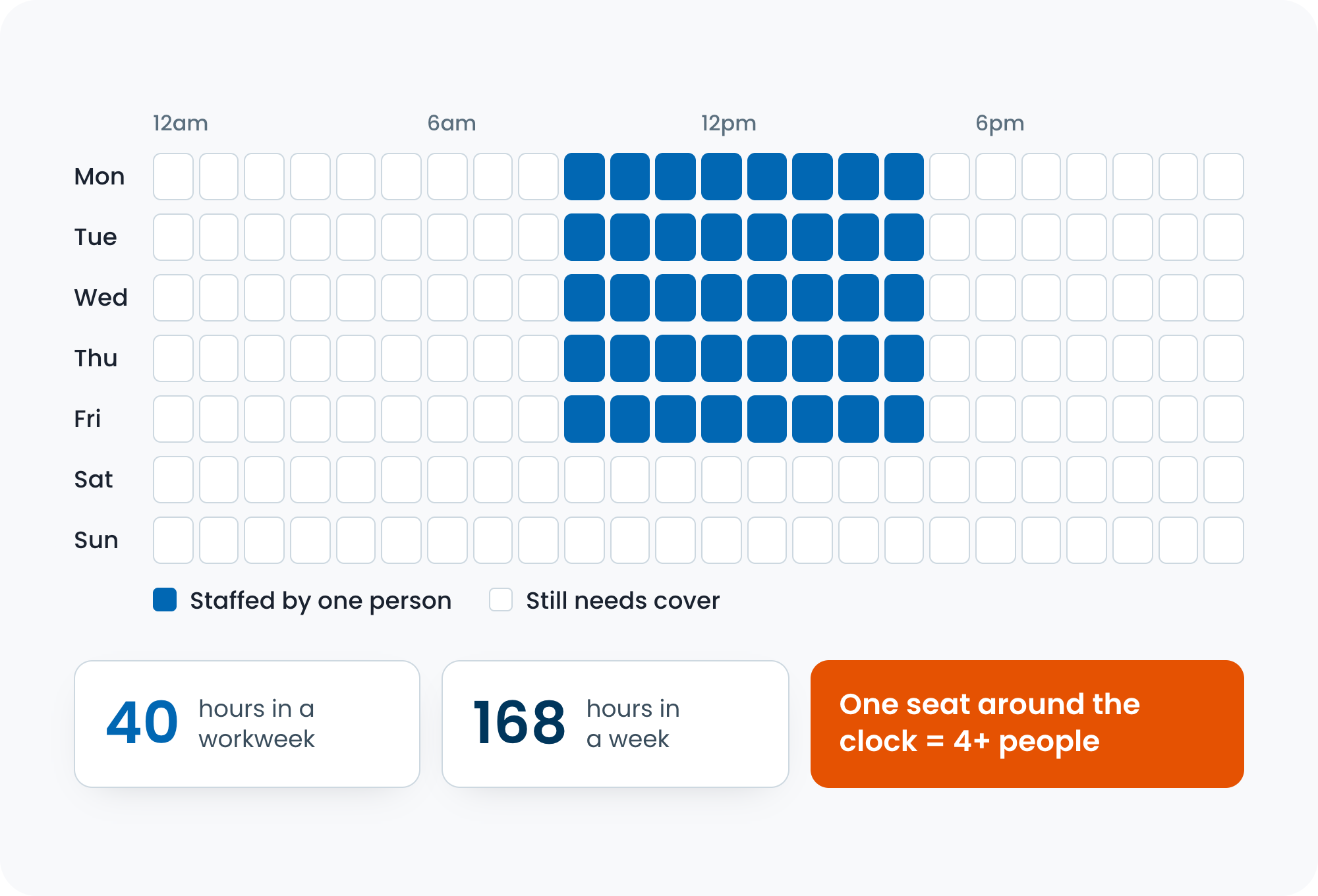
The math explains why. One seat covered around the clock adds up to 168 hours a week. Divide that by a 40-hour workweek, and you need more than four full-time people before leave and sick days come into play. That is why many internal teams stop at business hours and leave an 11 pm ticket until morning.
Coverage Options: From Overflow to Full 24x7
There are three ways to outsource out-of-hours coverage, from lightest to full: after-hours overflow, nights and weekends only, or full 24x7.
| Option | Who it suits | What you hand off |
|---|---|---|
| After-hours overflow | Teams that cover the day but miss evenings | Requests outside your hours, plus overflow when your queue backs up |
| Nights and weekends | Teams that want to keep daytime support in-house | Every out-of-hours request |
| Full 24x7 | Users across time zones, or services that never switch off | The whole first line, around the clock |
Out-of-hours service desk outsourcing is a common starting point because it fills the gap your team cannot staff while daytime support stays where it is. Teams with users in several time zones, or services that cannot go dark overnight, often need 24x7 outsourced IT support from the start.
What Changes Overnight?
Volume often drops overnight, while the ticket mix gets harder: fewer how-to questions, more lockouts and outages. Agree before launch who gets woken up when something needs your sign-off, and name an on-call contact for every escalation path.
What Should You Check Before You Sign?
Before signing with a 24/7 outsourced help desk, check three things: the SLA tracking dashboard, SLAs broken out by time band, and the number of agents actually on shift overnight. You should be able to check response and resolution times yourself at 3 am without waiting for an account manager.
CallTek’s Shared Support model is built for this kind of after-hours help desk coverage. Our AI IT support can also handle repetitive requests in the hours your team can’t staff.
The Cost to Outsource a Help Desk
The cost to outsource a help desk comes down to three things: the billing model, your coverage hours, and your ticket volume. Put every quote on the same model before you compare them, and the differences between providers become much easier to see.
The Four Pricing Models
Help desk providers bill in four ways: per user per month, per ticket or contact, per agent hour, or a fixed fee for a dedicated team.
| Model | How it's billed | Best for | Watch out for |
|---|---|---|---|
| Per user per month | A flat fee for each supported user or device | Stable headcount and predictable budgets | Paying for users who rarely raise a ticket |
| Per ticket or contact | A fee for each request handled | Low or uneven volume | Costs climbing in a bad month, and how the provider defines one ticket |
| Per agent hour | Billed for staffed hours | Defined coverage windows, such as nights only | Paying for idle time on quiet shifts |
| Dedicated team | A fixed fee for a named team | High volume or complex environments | A higher floor, and notice periods if you need to scale down |
When a provider quotes a help desk outsourcing cost per month, ask which model sits underneath it. Two monthly figures built on different models are not directly comparable.
An average cost per ticket needs the same care. It only means something once you know what the provider counts as a ticket and which tiers it covers.
What Drives the Cost
Coverage hours and ticket volume drive most of the cost, followed by ticket mix, channels, languages, and the tiers in scope.
- Coverage hours - Nights, weekends, and holidays need more people on the rota.
- Ticket volume and how predictable it is - Spiky volume costs more to staff than steady volume.
- Ticket mix - Password resets close faster than troubleshooting that needs your runbooks.
- Channels - Phone, email, chat, and web forms each need staffing and tooling.
- Languages - Every added language narrows the pool of agents who can take the shift.
- Tiers in scope - Tier 2 work needs more training and more experienced agents.
Outsourced IT support costs follow the same logic, whether you are comparing a help desk alone or a broader support scope.
Outsourced vs In-House Help Desk Cost
Outsourcing often costs less once you include the in-house costs people miss: recruiting, training, turnover, tooling, management time, and premiums for night or weekend shifts. The case is strongest when you need out-of-hours coverage, or your volume is uneven. In-house support can still make sense when tickets are steady, complex, and mostly arrive during business hours.
Help desk outsourcing for small offices usually means a shared model, since you may not have enough tickets to justify a full-time hire but still need someone answering after hours.
At CallTek, Shared Support and Dedicated Teams map onto these models, and working out which one fits is the first conversation we have with a new client.
How to Outsource IT Services Without Losing Control of the Queue
You keep control when you outsource IT services by deciding scope, coverage hours, and escalation paths before a provider’s proposal shapes them for you. These seven steps take you from ticket data to a desk that can actually run.
- Pull 90 days of ticket data. Look at volume by hour and day, categories, channels, and how long each type takes to close. This tells you what to hand off and when.
- Decide scope by tier. List what the provider resolves, what they escalate, and what never leaves your team.
- Set your coverage hours. Use the hourly data to choose between after-hours overflow, nights and weekends, or full 24x7.
- Pick a model. A shared model suits steady volumes and a fast launch, and a dedicated team suits complex environments and higher volumes.
- Shortlist providers and send an RFP. Choosing an outsourced helpdesk provider gets easier when every provider answers the same questions, so the contract checklist below can double as the backbone of your RFP.
- Run the transition. Hand over runbooks and knowledge base access, agree escalation contacts, and start with a pilot on one queue or one shift.
- Review every month. Evaluating an outsourced IT help desk doesn't stop at launch, so check SLA reports against your targets and adjust scope as the provider learns your environment.
If you are wondering how to outsource your IT help desk without turning it into a long project, don't skip steps one and two. Everything after them moves faster when the data and the scope are already on paper.
What to Put in a Help Desk Contract

A help desk contract should pin down scope, SLAs by priority and time band, reporting access, escalation, and exit terms. Those clauses determine whether the arrangement still works after the launch period.
The key factors to consider when selecting a help desk outsourcing service are the same items, roughly in that order.
Use this help desk outsourcing contract checklist to compare providers side by side or as the backbone of your RFP.
| Clause | What to ask for |
|---|---|
| Scope and exclusions | A written list of what the provider resolves, what they escalate, and what's out of scope |
| SLAs | Response and resolution targets by priority and by time band, plus what happens when they're missed |
| Reporting | Live dashboard access and a monthly report against every SLA |
| Escalation | Named contacts, on-call rules, and who signs off on changes |
| Security and compliance | A current SOC 2 Type 2 report, access controls, and how your data is stored and deleted |
| Staffing | Who works your queue, how they're trained on your environment, and what certifications they hold |
| Knowledge ownership | Runbooks and knowledge base content stay yours, including anything the provider writes |
| Price review | When rates can change and how much notice you get |
| Exit and transition | Notice period, handover support, and return of your data |
| Location | Where agents are based, whether you need a US-based help desk for certain hours, and which hours each site covers |
Quick response times only count when the contract assigns a number to them, and a monthly report can prove the result.
When you are shortlisting enterprise help desk outsourcing providers, ask whether the team holds HDI certification and how many of the people who would actually work your queue have it.
Before you sign, send each provider an outsourcing vendor document request list covering the security report, sample SLA reports, insurance, and references. Comparing those documents side by side will tell you more than a round of sales calls.
Outsourced Helpdesk for MSPs, ISPs and Hospitality
Help desk outsourcing tends to pay off most for teams whose end users need help at volume and at all hours. MSPs, ISPs, and hospitality operators all fit that pattern, and healthcare and education have their own needs.
MSPs
An outsourced helpdesk for MSPs takes Tier 1 under your brand, so your engineers stay on projects and client work. White-label support answers as your team and routes escalations back to you.
ISPs and Telecom
Outsourcing ISP and telecom support takes high-volume, repetitive work off your team: connectivity drops, router setup, and outage updates, often outside office hours. For ISP tech support outsourcing, look closely at how the provider handles outage surges and the escalation path to network operations.
Hospitality
Outsourcing hospitality help desk support can cover guest connectivity and property technology 24/7. That matters because guests expect Wi-Fi to work at midnight, and front-desk staff are rarely set up to fix it.
Healthcare and Education
IT help desk outsourcing for hospitals adds a compliance layer, since agents need clear limits on what data they can access and the contract has to reflect healthcare privacy requirements. Education teams follow a different pattern: demand spikes at the start of term and drops over breaks, so a per-ticket or shared model often suits them.
Multi-location organizations need one extra step wherever they sit: a runbook per site, since setups and contacts differ from one location to the next.
Frequently Asked Questions
Is outsourced help desk cheaper than in-house support?
It often is once you count the full in-house cost: recruiting, training, turnover, tooling, and out-of-hours shifts. The gap is widest when you need nights and weekends covered or your volume is uneven. The cost section above compares the four pricing models.
What is tier 1 help desk outsourcing?
Tier 1 help desk outsourcing hands the first line of support to a provider: password resets, account access, how-to questions, and basic troubleshooting. Anything the provider can't resolve escalates to your team with the ticket history attached.
Is a service desk a BPO?
A service desk is a support function. When a provider runs it for you, the arrangement counts as business process outsourcing (BPO).
What is help desk as a service?
Help desk as a service is an outsourced help desk sold as a subscription, usually billed per user or per ticket. The work is the same as any other help desk outsourcing, and the label describes how it's billed.
Can I outsource help desk scheduling?
Yes. Providers handle their own agent scheduling to cover the hours in your contract, so you agree on the coverage windows, and they staff them. If you also need agents to book appointments for your users, write that into the scope.
Where to Start
If you're still weighing it, start with the ticket data. It usually makes the decision clearer than any proposal will, and it makes every provider conversation shorter.
When you're ready to talk it through, see how CallTek runs its help desk outsourcing services or book a strategy call with our team.
Book Strategy Call